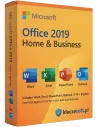
Microsoft Office 2019 dla Użytkowników Domowych i Małych Firm (Home & Business) to wieczysta licencja pakietu biurowego stworzona dla jednoosobowych działalności, biur rachunkowych i mikrofirm, które potrzebują legalnego Worda, Excela, PowerPointa i Outlooka bez subskrypcji Microsoft 365. Kupujesz raz, korzystasz bez opłat rocznych — pełne prawo do użytku komercyjnego, faktura VAT 23% i dostawa klucza e-mailem w kilka minut po zaksięgowaniu płatności.
Kluczowe informacje o Office 2019 Home & Business
- Edycja: Home & Business (komercyjna — z Outlookiem)
- Aplikacje: Word, Excel, PowerPoint, Outlook 2019
- Typ licencji: wieczysta, jednorazowy zakup, jedno stanowisko
- Platforma: Windows 10 i Windows 11 (wersja Mac jest osobnym produktem)
- Język interfejsu: polski oraz pozostałe języki Microsoft
- Dostawa: klucz cyfrowy e-mailem w kilka minut po zaksięgowaniu płatności
- Faktura VAT 23% do każdego zamówienia
Czym Office 2019 Home & Business różni się od pozostałych edycji
Edycja Home & Business zawiera Outlooka i obejmuje pełne prawo do użytku komercyjnego — to kluczowa różnica wobec Home & Student, który Outlooka nie ma i jest wyłącznie do użytku domowego. Jeśli potrzebujesz dodatkowo Accessa lub Publishera, wybierz Office 2019 Professional Plus. Jeśli planujesz długie wsparcie producenta, rozważ nowszy Office 2024 — Office 2019 to wybór dla firm, którym zależy na sprawdzonej, wieczystej wersji bez ryzyka zmian funkcjonalnych i bez abonamentu.
Dla kogo jest Office 2019 dla Użytkowników Domowych i Małych Firm
- Jednoosobowe działalności (JDG) wystawiające faktury, prowadzące korespondencję i prezentacje klienckie
- Małe biura rachunkowe i kancelarie, w których Excel i Word są codziennym narzędziem pracy
- Mikrofirmy i rodzinne firmy usługowe potrzebujące Outlooka do obsługi poczty firmowej
- Użytkownicy domowi pracujący zdalnie, którzy chcą uniknąć cyklicznych opłat za Microsoft 365
Wymagania i instalacja
Wymagania systemowe: Windows 10 lub Windows 11, procesor 1,6 GHz (dwurdzeniowy), 4 GB RAM, 4 GB wolnego miejsca na dysku, konto Microsoft (lub założenie nowego), aktywne łącze internetowe na czas aktywacji.
- Zaloguj się na konto Microsoft (lub utwórz nowe) pod adresem setup.office.com
- Wprowadź otrzymany klucz produktu w polu „Wpisz klucz produktu"
- Pobierz instalator Office 2019 i uruchom instalację
- Po zakończeniu instalacji otwórz dowolną aplikację (np. Word) i potwierdź aktywację
- Wystaw fakturę VAT z poziomu panelu zamówienia lub w odpowiedzi mailowej
Aktywacja i najczęstsze błędy
Aktywacja przebiega online przy pierwszym uruchomieniu dowolnej aplikacji pakietu. Najczęstsze problemy i ich szybkie rozwiązania:
- 0xC004C060 — klucz już powiązany z innym kontem Microsoft: zaloguj się na właściwe konto i ponów aktywację.
- 0xC004F074 — brak połączenia z serwerem aktywacyjnym Microsoft: sprawdź internet, wyłącz chwilowo VPN lub firewall i powtórz.
- 0x80070005 — brak uprawnień administratora: uruchom aplikację Office jako administrator i ponownie wprowadź klucz.
Co otrzymujesz
- Oryginalny klucz cyfrowy Microsoft Office 2019 Home & Business
- Instrukcja aktywacji w języku polskim (krok po kroku)
- Faktura VAT 23% wystawiona na firmę lub osobę prywatną
- Certyfikat legalności wystawiony przez Selected Supply Sp. z o.o. (NIP 7272834817, KRS 0000765817)
- Wsparcie przy aktywacji przez 7 dni od zakupu
Najczęściej zadawane pytania
Czy zakup Microsoft Office 2019 Home & Business w KluczeSoft jest legalny i oryginalny?
Tak. Otrzymujesz oryginalny klucz produktu wraz z certyfikatem legalności wystawionym przez Selected Supply Sp. z o.o. (NIP 7272834817) oraz fakturą VAT 23%. Zakup jest w pełni zgodny z polskim prawem i z licencjonowaniem Microsoft do użytku komercyjnego.
Czy Office 2019 Home & Business to licencja wieczysta czy subskrypcja?
To licencja wieczysta. Kupujesz raz, używasz bez ograniczeń czasowych i bez opłat rocznych — w odróżnieniu od subskrypcji Microsoft 365, gdzie po wygaśnięciu abonamentu tracisz dostęp do aplikacji.
Czy do zamówienia otrzymam fakturę VAT 23%?
Tak, faktura VAT 23% jest wystawiana do każdego zamówienia (firmowego i prywatnego) i wysyłana razem z kluczem aktywacyjnym e-mailem.
Jak szybko otrzymam klucz po zakupie?
Klucz wysyłamy e-mailem zazwyczaj w ciągu kilku minut po zaksięgowaniu płatności. W godzinach pracy biura realizacja jest praktycznie natychmiastowa.
Co zrobić, jeśli aktywacja nie przejdzie (np. błąd 0xC004C060)?
W większości przypadków wystarczy zalogować się na właściwe konto Microsoft i powtórzyć aktywację. Nasze wsparcie pomaga przez 7 dni od zakupu — wystarczy odpisać na maila z kluczem, a doradca przeprowadzi Cię krok po kroku.
Na ilu komputerach mogę używać licencji i czy mogę ją przenieść?
Licencja Home & Business jest przeznaczona na jedno stanowisko (jeden komputer w danym czasie). Po dezaktywacji na starym sprzęcie możesz aktywować ją na nowym — wystarczy odinstalować pakiet z poprzedniego urządzenia.
Czym różni się klucz MAK od wersji retail?
Wersja retail (pudełkowa) jest przypisywana do konta Microsoft i przenoszalna między urządzeniami; MAK to licencja wolumenowa dla wdrożeń firmowych z większą liczbą stanowisk. Ten produkt jest sprzedawany w wariancie do standardowego, legalnego użytku z fakturą VAT — szczegóły typu klucza są opisane w wiadomości realizacyjnej.
Dlaczego warto kupić Office 2019 Home & Business właśnie w KluczeSoft?
Oryginalny klucz, faktura VAT 23%, dostawa w kilka minut e-mailem i polskie wsparcie aktywacyjne — to legalna alternatywa wobec tanich kluczy nieznanego pochodzenia z giełd ogłoszeniowych, których aktywacja często przestaje działać po kilku tygodniach.
Sprzedawca: Selected Supply Sp. z o.o. (NIP 7272834817).